Affichage des articles dont le libellé est Libgdx. Afficher tous les articles

mercredi 27 janvier 2016

Previews II

Hello,

Here are the different turrets that will be available in the game:

Gatling gun:


The gatling gun shoot a high velocity bullets with an high rate of fire, it efficient against most of fighters and can be used as defense platforms against ennemy missiles.
Small cannon: 

The small canon can only shoot standard explosives shells. The rate of fire is lower than the gatling turret but the damages are higher. The small canon is powerfull against light or heavy fighters/bombers formations due the blasting power of the shells used. Bigger ships will need more firepower to be destroyed.
Medium cannon:

The medium canon is a response of the lack of power the cannon have against bigger ships like frigates it can use a variety of shells (Armor Piercing shells, Incendiary shells, High Velocity shells, IEM shells...). It is efficient against light frigates and is usefull to saturate shield of bigger ships.

Big cannon:

The big canon is powerfull against bigger ships like frigates, destroyers, cruisers. As the medium canon it can use a large variety of shells. But due to the slow rate of fire it is mostly used against big slow ships rather than fighters or bombers.


Rocket launcher:


The rocket launcher is usefull when you need a fast shooting burst of rockets. it's simple, fast and deadly.


Missile launcher:


The missile launcher allow you to deliver a tracking explosive package to your ennemies, you can use different type of missiles (Fragmentation missiles, IEM missiles, High Velocity missiles...). The rate of fire is quite slow but the missile will never loose his target as long as it didn't get hit by some defensive shells.

Enforcer cannon:

The enforcer canon is used by assault frigates the plasma burst of this weapon can destroy shields and armor in a single shot. but the range of the weapon and the reloading time needs a good timed and coordinated attack. This special weapon is only used by enforcer frigates, specialized in close quarter battle.


Spear cannon:

The spear canon is mounted on cruisers, dreadnoughts and capital ships, it firepower allow to destroy big ships with ease, but the rate of fire and the reloading time is slow.


Previews I

Hello all,

Here you can find some preview screenshots of the game:

Title screen:

Albatros ship mkI (bomber):

Gatling turret:


Stars Artifacts

Stars Artifacts grows in my mind a few years ago, it grows bigger and bigger and then after reading some books and articles about Java game programming I decided to make it real. So here we are.

Stars Artifacts will be first a simple old school shoot them up with some additionnal stuff added progressively, I want it to finally end as a multiplayer space ship simulation game, a kind of freelancer in 2d...

I don't know if I'll reach this goal and how long it'll take me to get a playable version but I'll try hard to work on it.

I'll free the source code once I judge the game ready for that.

This game will use slick 2d  ligdx with eclipse and some pixel art graphics.

mercredi 13 janvier 2016

Libgdx setup configuration with Eclipse - Part 5: Configuring Android SDK Tools

Once you've installed the Android SDK Tools you'll be able to launch the Android SDK Manager

Here it is.

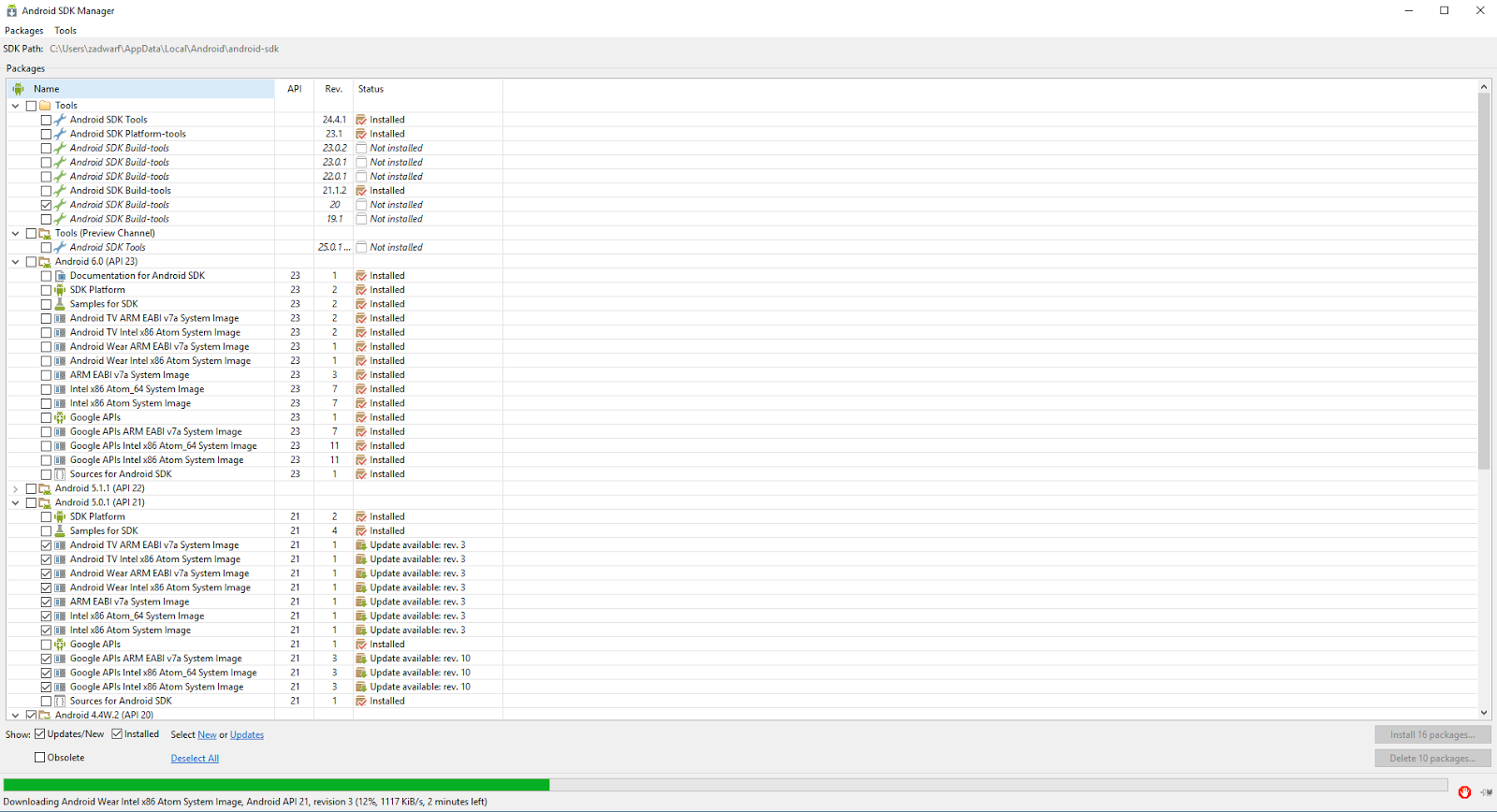
Launch it and you'll get a wonderfull scary application in front of you:

Omagad! What the fuck is that ?! o_O

If you don't know what you are supposed to do with it:

You can go to the following link:

Were you'll get usefull information about Android terminal used worldwide sucha as Android version distribution, open GL version distribution...

We will use the Platform Versions information to configure our Android SDK Manager, in the screenshot below you can see percentage of Android version used with related API:


You have to choose your API depending on number of people you want to reach or functionnalities you will use. Please check this post for quick configuration: http://stackoverflow.com/questions/26535897/which-android-api-to-use-in-libgdx-android-sdk-manager

Here is what I use for example:

vendredi 18 septembre 2015

Libgdx setup configuration with Eclipse - Part 3: Android SDK Tools

Now you have to download the Android SDK Tools:

1) Super fast shortcut
If you want to download directly what you need go here:
https://developer.android.com/sdk/index.html#Other

2) Shortcut

There is a shorter path if you click on Other Download Options so you get directly to the download you need:

3) The (too) long way

- Go to the link below if you want to spend time by clicking useless links:
https://developer.android.com/sdk/index.html

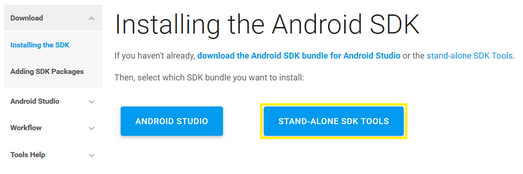
- Click on Installing the SDK, as we didn't need Android Studio (>1Go download... -_-') we will just download the stand alone SDK (136Mo download  yeah! \o/)

- So click on Stand alone SDK Tools:


Go to Part 4: Libgdx setup configuration with Eclipse - Part 4: Android SDK Tools

Libgdx setup configuration with Eclipse - Part 4: Android SDK Tools

- You'll get a new page of blahblahblah stand alone sdk tools only includes the sdk tools (thanks captain obvious...), click on download the SDK now ("and stop bother me with your 1Go download :D")


- Once you click on this link you'll go to a new page already focused on the bloody android studio bundle package...


Ah bastard...

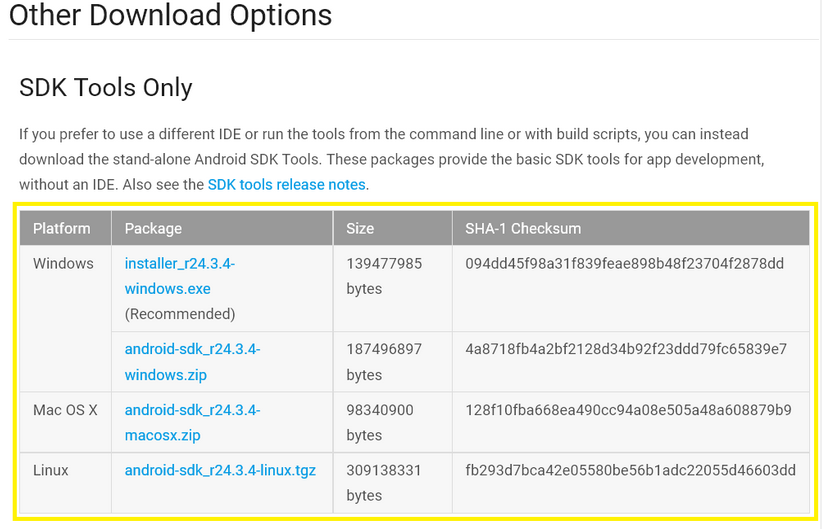
 Scroll up and you'll find what you need:


- So now download the one you need and install it (again with default option it works perfectly) it will normally open the SDK Manager if not you can find it on your computer at: C:\Users\YourUser\AppData\Local\Android\android-sdk, assuming you install the SDK Tools with default options and YourUser is your user name in Windows

Libgdx setup configuration with Eclipse - Part 1: introduction & my hardware/software configuration

Hello world,

[LAST UPDATE 19/10/2016]

Today I'll give you my configuration setup for Libgdx with Eclipse, this will update some stuff visible on the book Learning Libgdx Game Development (first edition) from PacktPub. As Libgdx and software updates regularly I'll provide you my hardware and software from the time I setup my Libgdx development environment on Eclipse. Everything here maybe not usefull, some things probably have to be modified and/or optimized...

My hardware and software configuration is:

    - Surface Pro 2 (i5-4300U CPU, 4 Go ram)
    - Windows 10
    - Mozilla Firefox v49.0.1
    - Eclipse version: Neon.1 Release (4.6.1)
      Build id: 20160913-0900
  
    - Java version returned from command line:
    java -version
    java version "1.8.0_92"
    Java(TM) SE Runtime Environment (build 1.8.0_92-b14)
    Java HotSpot(TM) 64-Bit Server VM (build 25.92-b14, mixed mode)
  
    - Android SDK Tools v1.16 with following API installed:
    Android 6.0 (API 23)
      Android M (API 22, MNC preview)
      Android 5.1.1 (API 22)
      Android 5.0.1 (API 21)
      Android 4.4W.2 (API 20)
      Android 4.4.2 (API 19)
      Android 2.2 (API 8)

      Android SDK Tools Rev. 24.3.4
    
      Android SDK Platform-tools Rev. 23.0.1
    
      Android SDK Build-tools Rev. 20

That's all for the hardware/software part.

Before anything it is recommended to create a folder on your computer where you'll put everything you need so that you have everything at you fingertips.

What you need:
- Eclipse (Part 2)
- JRE & JDK (Part 2)
- Configure variables (Part 2)
- Android SDK Tools (Part 3 & Part 4)
- Eventually a GitHub account if you want to share your code.

Go to Part 2: Libgdx setup configuration with Eclipse - Part 2: Eclipse, JRE, JDK and variables

Libgdx setup configuration with Eclipse - Part 2: Eclipse, JRE, JDK and variables

[LAST UPDATE 19/10/2016]

First you have to download Eclipse here, I use the Luna version as some plugins are not implemented for Eclipse Mars yet, no installation is required for Eclipse just put it where you want:
https://eclipse.org/downloads/eclipse-packages/

Get JRE and JDK here from the time I'm writing (19/10/2016) JRE and JDK version 8u112:

JRE: http://www.oracle.com/technetwork/java/javase/downloads/jre8-downloads-2133155.html

JDK: http://www.oracle.com/technetwork/java/javase/downloads/jdk8-downloads-2133151.html
Once you get both JRE and JDK install them with default parameters.

Now you have to configure you variables, on windows:

- Right click on "This Computer" on the Windows explorer then go to properties:

- Then click on Advanced System Parameters as visible in the screenshot below:

- Then click on Environment variables as visible in the screenshot below:

- Now you have to configure two variables JAVA_HOME and PATH, click on new button on the User Variables part:
- Then fill up the form as below assuming your JDK is installed on C:\Program Files\Java\jdk1.8.0_60


Go to part 3: Libgdx setup configuration with Eclipse - Part 3: Android SDK Tools

jeudi 11 juin 2015

Libgdx issue with RGB color not appearing correctly (glClearColor)

Hello world,

Today i'll give you a tip I found while I searching on the internet about an issue related to RGB color not displayed correctly in Libdgx.

I was searching for a nice blue background for sky in Piou with GraphicsGale and get the RGB code for it:


 So in my Java code I wrote:
Gdx.gl.glClearColor(0, 187, 249, 0);
but when I launched the game the color appears as an eye bleeding cyan:
Aaaaargh Y_Y it burns my eyes !!!!

So I searched why the blue didn't appears as it must be and I've found an answer on Stackoverflow so I modified my code with:
Gdx.gl.glClearColor(0/255f, 187/255f, 249/255f, 0);
And finally get the blue sky correctly displayed:
Fiuuuu, it's faaaaaar better :)

Hope this will help some people arround here.

mercredi 4 février 2015

Books i'm reading about Libgdx

Hello world,

Today i'll show you some books i read to learn Libgdx game development


Learning Libgdx Game Development by Andreas Oehlke is the first book i bought about Libgdx. the book is really clear to understand and allow us create a platform game step by step. The code is correctly explained and accompanied by illustrations. There is a second edition of this book i didn't read yet. The publisher Packt Publishing allow us to get the physical or digital version of the book or both, which is really nice as we sometimes cannot carry physical books for practical reason.

LibGDX Game Development Essentials by Juwal Bose is a step by step book to make a flappy bird clone game with additionnal stuff. I didn't fully read it yet but from what i saw the book explain many way how to create a Libgdx project. The quality is same to Learning Libgdx Game Development book.

Libgdx Cross-platform Game Development Cookbook by David Saltares Márquez and Alberto Cejas Sánchez contains code recipes with illustrated examples. I didn't read it yet but it looks very interesting as it covers many aspect of Libgdx and game development (2D sound system, Box2D...).

Also you can find many ressources online about Libgdx here is some usefull links:

https://github.com/libgdx/libgdx/wiki the 
official Libgdx wiki

http://steigert.blogspot.fr/ (in english) a blog with Libgdx tutorials
http://tutoriel-libgdx-android.blogspot.fr/ (in french) a blog with Libgdx tutorials
http://obviam.net/ (in english) a blog with Libgdx tutorial
http://www.creationjeuxjava.fr/home (in french) Libgdx video tutorials
https://anthdeldeveloper.wordpress.com (in english) a game developper blog with an asteroid game tutorial
http://www.codeproject.com/Articles/702957/Create-your-first-Android-Game-with-libgdx complete example of simple game made with Libgdx
http://www.java-gaming.org/ (in english) a great community of Java game developpers
http://www.b4x.com/ (in english) forum post introducing to Libgdx
http://stackoverflow.com/ usefull website based on question/answer system
http://dmentrard.free.fr/ mathematics and physics notion explained with animations
http://opengameart.org/ free graphics to use with your game