Affichage des articles dont le libellé est Games. Afficher tous les articles

mercredi 13 janvier 2016

Libgdx setup configuration with Eclipse - Part 5: Configuring Android SDK Tools

Once you've installed the Android SDK Tools you'll be able to launch the Android SDK Manager

Here it is.

Launch it and you'll get a wonderfull scary application in front of you:
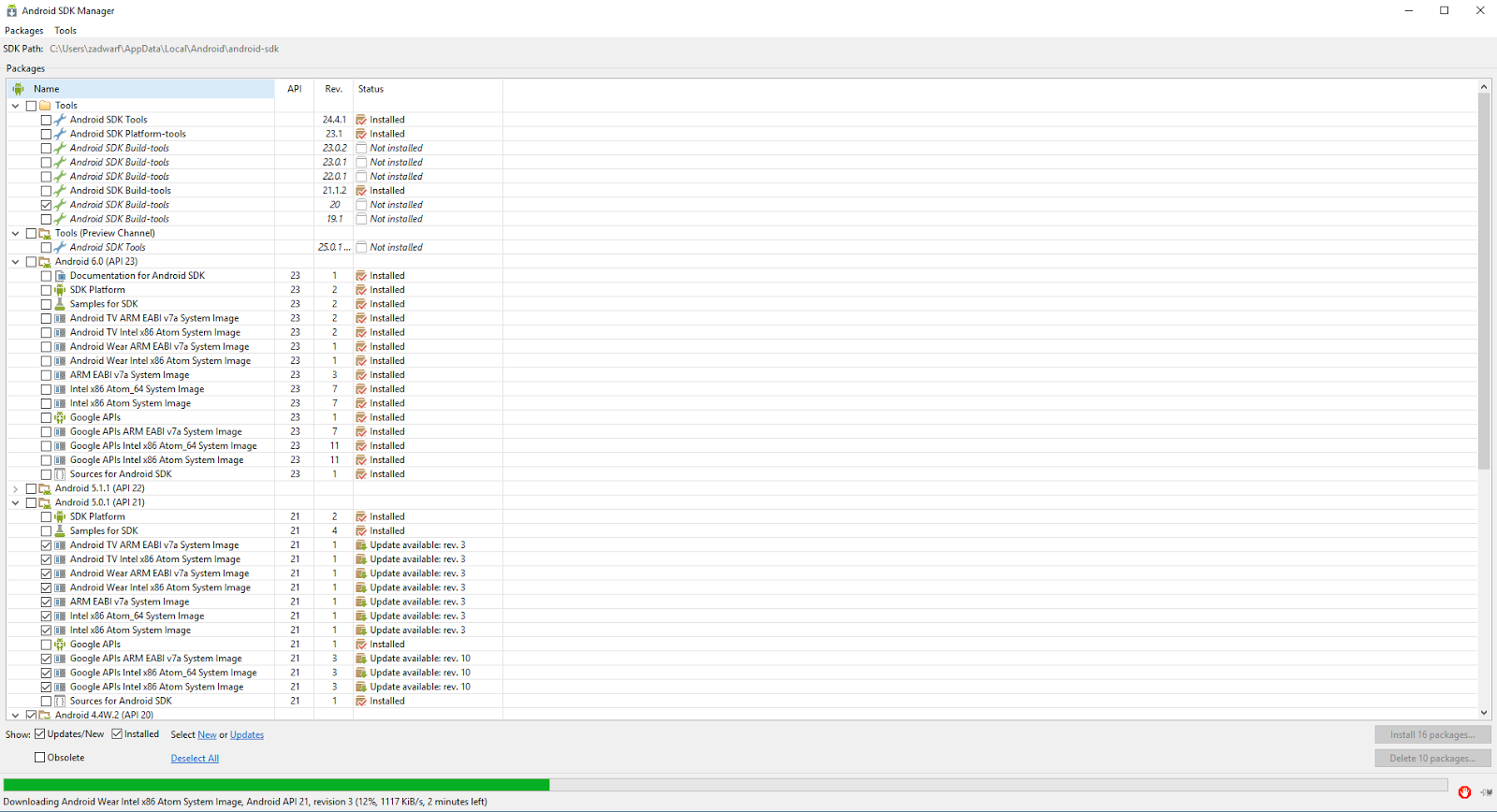
Omagad! What the fuck is that ?! o_O

If you don't know what you are supposed to do with it:

You can go to the following link:

Were you'll get usefull information about Android terminal used worldwide sucha as Android version distribution, open GL version distribution...

We will use the Platform Versions information to configure our Android SDK Manager, in the screenshot below you can see percentage of Android version used with related API:


You have to choose your API depending on number of people you want to reach or functionnalities you will use. Please check this post for quick configuration: http://stackoverflow.com/questions/26535897/which-android-api-to-use-in-libgdx-android-sdk-manager

Here is what I use for example:

vendredi 18 septembre 2015

Libgdx setup configuration with Eclipse - Part 3: Android SDK Tools

Now you have to download the Android SDK Tools:

1) Super fast shortcut
If you want to download directly what you need go here:
https://developer.android.com/sdk/index.html#Other

2) Shortcut

There is a shorter path if you click on Other Download Options so you get directly to the download you need:

3) The (too) long way

- Go to the link below if you want to spend time by clicking useless links:
https://developer.android.com/sdk/index.html

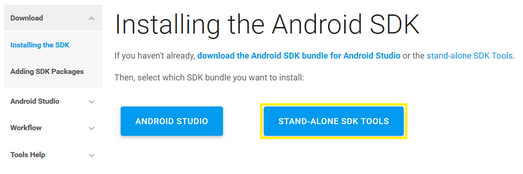
- Click on Installing the SDK, as we didn't need Android Studio (>1Go download... -_-') we will just download the stand alone SDK (136Mo download  yeah! \o/)

- So click on Stand alone SDK Tools:


Go to Part 4: Libgdx setup configuration with Eclipse - Part 4: Android SDK Tools

Libgdx setup configuration with Eclipse - Part 4: Android SDK Tools

- You'll get a new page of blahblahblah stand alone sdk tools only includes the sdk tools (thanks captain obvious...), click on download the SDK now ("and stop bother me with your 1Go download :D")


- Once you click on this link you'll go to a new page already focused on the bloody android studio bundle package...


Ah bastard...

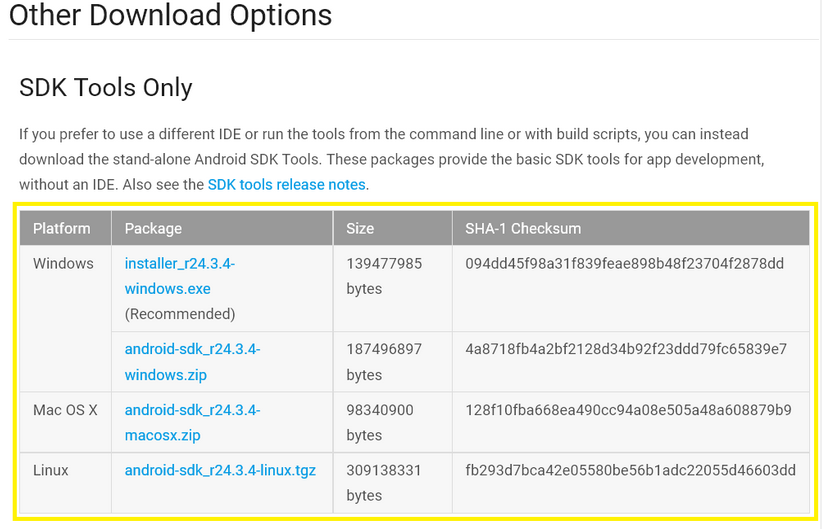
 Scroll up and you'll find what you need:


- So now download the one you need and install it (again with default option it works perfectly) it will normally open the SDK Manager if not you can find it on your computer at: C:\Users\YourUser\AppData\Local\Android\android-sdk, assuming you install the SDK Tools with default options and YourUser is your user name in Windows

Libgdx setup configuration with Eclipse - Part 1: introduction & my hardware/software configuration

Hello world,

[LAST UPDATE 19/10/2016]

Today I'll give you my configuration setup for Libgdx with Eclipse, this will update some stuff visible on the book Learning Libgdx Game Development (first edition) from PacktPub. As Libgdx and software updates regularly I'll provide you my hardware and software from the time I setup my Libgdx development environment on Eclipse. Everything here maybe not usefull, some things probably have to be modified and/or optimized...

My hardware and software configuration is:

    - Surface Pro 2 (i5-4300U CPU, 4 Go ram)
    - Windows 10
    - Mozilla Firefox v49.0.1
    - Eclipse version: Neon.1 Release (4.6.1)
      Build id: 20160913-0900
  
    - Java version returned from command line:
    java -version
    java version "1.8.0_92"
    Java(TM) SE Runtime Environment (build 1.8.0_92-b14)
    Java HotSpot(TM) 64-Bit Server VM (build 25.92-b14, mixed mode)
  
    - Android SDK Tools v1.16 with following API installed:
    Android 6.0 (API 23)
      Android M (API 22, MNC preview)
      Android 5.1.1 (API 22)
      Android 5.0.1 (API 21)
      Android 4.4W.2 (API 20)
      Android 4.4.2 (API 19)
      Android 2.2 (API 8)

      Android SDK Tools Rev. 24.3.4
    
      Android SDK Platform-tools Rev. 23.0.1
    
      Android SDK Build-tools Rev. 20

That's all for the hardware/software part.

Before anything it is recommended to create a folder on your computer where you'll put everything you need so that you have everything at you fingertips.

What you need:
- Eclipse (Part 2)
- JRE & JDK (Part 2)
- Configure variables (Part 2)
- Android SDK Tools (Part 3 & Part 4)
- Eventually a GitHub account if you want to share your code.

Go to Part 2: Libgdx setup configuration with Eclipse - Part 2: Eclipse, JRE, JDK and variables

Libgdx setup configuration with Eclipse - Part 2: Eclipse, JRE, JDK and variables

[LAST UPDATE 19/10/2016]

First you have to download Eclipse here, I use the Luna version as some plugins are not implemented for Eclipse Mars yet, no installation is required for Eclipse just put it where you want:
https://eclipse.org/downloads/eclipse-packages/

Get JRE and JDK here from the time I'm writing (19/10/2016) JRE and JDK version 8u112:

JRE: http://www.oracle.com/technetwork/java/javase/downloads/jre8-downloads-2133155.html

JDK: http://www.oracle.com/technetwork/java/javase/downloads/jdk8-downloads-2133151.html
Once you get both JRE and JDK install them with default parameters.

Now you have to configure you variables, on windows:

- Right click on "This Computer" on the Windows explorer then go to properties:

- Then click on Advanced System Parameters as visible in the screenshot below:

- Then click on Environment variables as visible in the screenshot below:

- Now you have to configure two variables JAVA_HOME and PATH, click on new button on the User Variables part:
- Then fill up the form as below assuming your JDK is installed on C:\Program Files\Java\jdk1.8.0_60


Go to part 3: Libgdx setup configuration with Eclipse - Part 3: Android SDK Tools

mercredi 4 février 2015

Free to play games

Hello world,

As a gamer myself i used to play lots of games, now i used to play free games or free to play games as i don't have unlimited money ^^ and nowadays AAA games are not so good (Call of Duty and Battlefield episodes are always the same and it's boring to death...).

Warthunder: a free to play air combat simulator, the graphics are good and the game can be played in three game modes, i used to play in arcade mode which is the more accessible mode when you didn't want spend time to learn simulator commands. 
This mode allow you to control your plane with keyboard + mouse, the first time i play this game i use a joystick in arcade battle and i get shot really easily by keyboard + mouse players, so that's what i use now. I tried some historical battles and it can be played with keyboard + mouse too but you only have one plane available for all the game if you loose it it's over for you. In arcade mode you can use lots of planes (actually i can use six planes for a single battle).
Pros:
+ Japanese planes are really fun to fly due to their agility you can turn better and get the hunter the hunted
+ Playing with friends can be really nice once you know some air combat tactics
+ It's always nice to get a kill on a russian plane
+ A bunch of planes to unlock
+ Many different playing styles
+ Free to play
Cons:
- Only five nation playable for now (Russia, Great Britain, Germany, Japan, USA)
- Russian planes in arcade battle shred you as paper (most of their planes have cannons even the first planes)
- Most arcade players didn't play correctly (searching for "frags" instead playing the objectives, high altitude fighters not providing cover to bombers, heavy fighters hunting for japanese paper planes...)
- Japanese planes are really fragile
- Need to spend some time to unlock better planes.
- GUI not really clear (crew training, how to spend golden eagle (don't spend on backup plane as it's useless)
- Battle rating and matchmaking really sucks
Little fighters 2: a free to play beat'em up game playable in multiplayer, each character have is own special habilities (some can throw fireballs, some can fusion like Trunk and Sangoten ^^), you can also throw decoration elements and use weapons.You can even create your own character. Many game modes are available (coop, battle, tournament...). You can make a donation to support the developpers.
Pros:
+ Fun
+ Free
+ Indie game
+ Pixel art graphics
+ Many special habilities
Cons:
- None
Soldat: a free 2d action shooting game it can be played in multiplayer, you can pay for optional stuff like character customisation... or simply support the developper. The game is really fun and you can make your own maps, there are bots to play with, lots of weapons... There are many game modes available (Rambo mode is really nice ^^).
Pros:
+ Fun
+ Free
+ Boggie man with his chainsaw is hilarious ^^
+ Map editor
Cons:
- None
Blacklight: Retribution: a free to play Call of Duty like game mixed with manga elements like Ghost in the shell (tachikomas ^^). A nice feature of this game is the HRV (Hyper Reality Vision) which allows you to see through walls for a short time, you can't fire when using this mode, but i believe this allow the game to be fast and without much campers (as they can be quickly spoted and netralised). Another nice feature is the exo armor you can use in the game you unlock it after few frags it's like a two legged tank with high fire power and armor but slow speed what make it fun is that you can get killed easily with it if you don't have a good squad to cover you. The exo armor well used can change the battle but it have random weak spot (you can find using HRV) you can hit to destroy it, or you can use flame thrower to burn the pilot and use the armor later. All this makes the gameplay more fun than any Call of Duty or Battlefield game. Your character can be personalized with armor, helmet, weapon options... you can get by spending some ingame money (or real life of course...) but every object can be unlocked by playing. Also the game is beautifull even the maps are not really original and some gameplay concepts not really used (doors piracy...).
Pros:
+ Fun
+ Free
+ Fast 
Cons:
- Some people spend money to get more powerfull weapons (even it's not necessary as i play myself with standard stuff and reach to get good scores)
- Matchmaking needs to be equilibrated
Teeworld: a free 2D multiplayer shooter game with mutliple game type (CTF, Deathmatch...). Your character can use a hook to move which is a really nice gameplay idea (ninja style ^^). The game is like Quake Arena like in 2D with grenade launcher, rockets...
Pros:
+ Free
+ Fun
+ Big community + Map editor 
Cons:
- None