Affichage des articles dont le libellé est Graphics. Afficher tous les articles

mercredi 27 janvier 2016

Licence

Hello world,

All the content of this blog is available under the following licence:

Licence Creative Commons
MonsieurZad de Zadwarf est mis à disposition selon les termes de la licence Creative Commons Attribution - Pas d’Utilisation Commerciale - Partage dans les Mêmes Conditions 4.0 International.
Fondé(e) sur une œuvre à http://monsieurzad.blogspot.fr/

Previews II

Hello,

Here are the different turrets that will be available in the game:

Gatling gun:


The gatling gun shoot a high velocity bullets with an high rate of fire, it efficient against most of fighters and can be used as defense platforms against ennemy missiles.
Small cannon: 

The small canon can only shoot standard explosives shells. The rate of fire is lower than the gatling turret but the damages are higher. The small canon is powerfull against light or heavy fighters/bombers formations due the blasting power of the shells used. Bigger ships will need more firepower to be destroyed.
Medium cannon:

The medium canon is a response of the lack of power the cannon have against bigger ships like frigates it can use a variety of shells (Armor Piercing shells, Incendiary shells, High Velocity shells, IEM shells...). It is efficient against light frigates and is usefull to saturate shield of bigger ships.

Big cannon:

The big canon is powerfull against bigger ships like frigates, destroyers, cruisers. As the medium canon it can use a large variety of shells. But due to the slow rate of fire it is mostly used against big slow ships rather than fighters or bombers.


Rocket launcher:


The rocket launcher is usefull when you need a fast shooting burst of rockets. it's simple, fast and deadly.


Missile launcher:


The missile launcher allow you to deliver a tracking explosive package to your ennemies, you can use different type of missiles (Fragmentation missiles, IEM missiles, High Velocity missiles...). The rate of fire is quite slow but the missile will never loose his target as long as it didn't get hit by some defensive shells.

Enforcer cannon:

The enforcer canon is used by assault frigates the plasma burst of this weapon can destroy shields and armor in a single shot. but the range of the weapon and the reloading time needs a good timed and coordinated attack. This special weapon is only used by enforcer frigates, specialized in close quarter battle.


Spear cannon:

The spear canon is mounted on cruisers, dreadnoughts and capital ships, it firepower allow to destroy big ships with ease, but the rate of fire and the reloading time is slow.


Previews I

Hello all,

Here you can find some preview screenshots of the game:

Title screen:

Albatros ship mkI (bomber):

Gatling turret:


jeudi 11 juin 2015

Libgdx issue with RGB color not appearing correctly (glClearColor)

Hello world,

Today i'll give you a tip I found while I searching on the internet about an issue related to RGB color not displayed correctly in Libdgx.

I was searching for a nice blue background for sky in Piou with GraphicsGale and get the RGB code for it:


 So in my Java code I wrote:
Gdx.gl.glClearColor(0, 187, 249, 0);
but when I launched the game the color appears as an eye bleeding cyan:
Aaaaargh Y_Y it burns my eyes !!!!

So I searched why the blue didn't appears as it must be and I've found an answer on Stackoverflow so I modified my code with:
Gdx.gl.glClearColor(0/255f, 187/255f, 249/255f, 0);
And finally get the blue sky correctly displayed:
Fiuuuu, it's faaaaaar better :)

Hope this will help some people arround here.

mardi 3 février 2015

How i export my sprites with GraphicsGale

Hello world,

Today i'll show you how i export my graphics on GraphicsGale

As my sprites are quite small for Brainman and Piou (16x16 pixels) i have to set the zoom at least at 1000% to get something i can draw on, the zoom level is visible on the following screenshots in yellow. You can also use Ctrl+mouse wheel to zoom in or out:

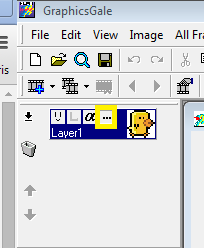
Once i have finished my modification i click on the [...] button visible in the below screenshot.

A pop up window will open where you can set a transparent color for your sprite, you have to check the Transparent Color option then click the color picker tool to select wich color you want transparent:
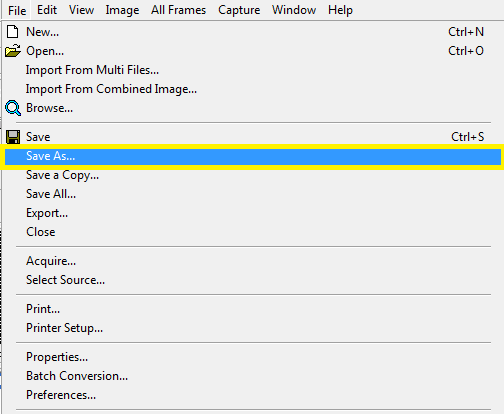
Once it's done you click on File -> Save As...


Then check With Alpha Channel option and select PNG as file type. Your file will register with the transparent color you selected.